How guests and AI assistants find Hotel Northampton
Prepared by Ethan Hawkes · checked 30 October 2026 (about 9:32 pm ET) · PDF copy
What we checked
- Your home page, fetched signed out
- Your robots.txt, sitemap and llms.txt
- The structured data (JSON-LD) that search engines and AI assistants read from your home page
- Every finding below is quoted exactly, with the page it came from and the time it was fetched
What we found on your site
“"@type":"WebPage"”

Source: https://www.hotelnorthampton.com/, fetched 2026-10-30 21:32 ET
The Yoast block on your home page lists WebPage, WebSite and breadcrumb types, but no Hotel entry. That entry is where search engines and AI trip planners read your address, phone, check-in times and price range as facts.
“content="The Hotel Northampton, built in 1927, offers 106 elegantly furnished guestrooms and luxury suites..."”
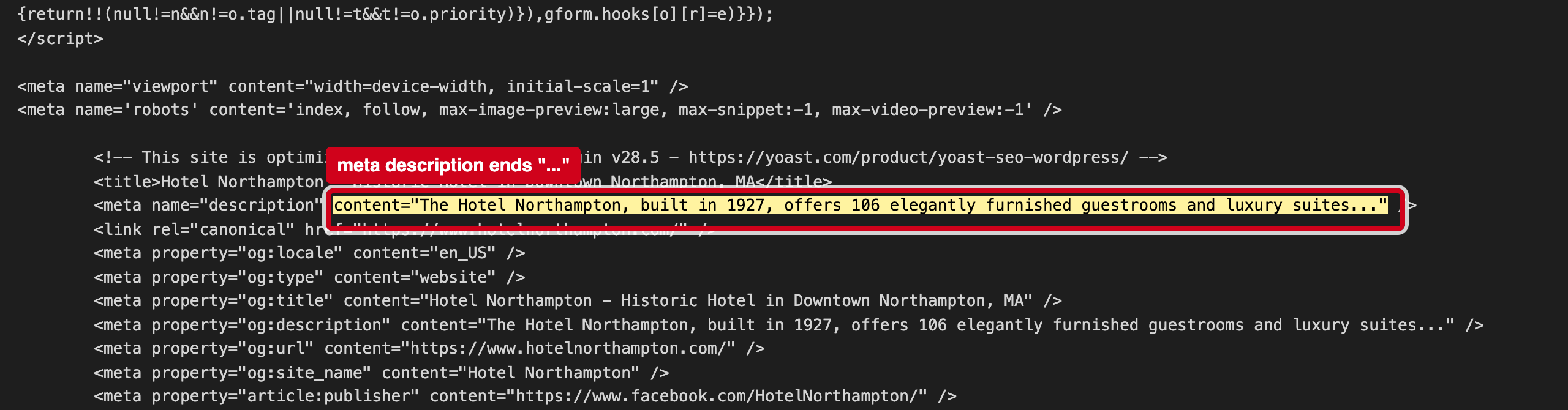
Source: https://www.hotelnorthampton.com/, fetched 2026-10-30 21:32 ET
This is the text Google usually shows under your name. It is cut off before it says where you are or why to stay.
Why it matters
Search engines and AI trip planners read the structured data block and the files at the root of your site to learn your basic facts. When those are missing or disagree with what a guest sees, machines either skip them or repeat the wrong version, and fill the gaps from booking sites instead of from you.
3 fixes, ranked
- Add a Hotel block.In Yoast (or a schema plugin), set the site to a Hotel / LodgingBusiness with address, phone, check-in/out and price range.Web · 30 minutes
- Finish the description.For example "Historic 1927 hotel at 36 King Street in downtown Northampton, MA, with 106 rooms and suites."Web · 10 minutes
- Test the home page in Google's Rich Results Test.Paste the home page URL into search.google.com/test/rich-results to confirm the hotel block reads the way you want.Web · 15 minutes
If it's useful, I'd welcome 20 minutes to compare notes on how guests are finding independent hotels now. — Ethan Hawkes, Signalry